Sunday, August 16, 2026
Recent:
  • Creative Activities for Kids – Apple Education – 9to5Mac
  • Recording Voiceovers
  • Easy Stereo Recording
  • CSPA Basic Skills Indicator
  • PunchUp Boring Shots with Rotobrush
alexharkness.com

alexharkness.com

DESIGN : DELIVER : INSPIRE

Recent Posts

  • Creative Activities for Kids – Apple Education – 9to5Mac
  • Recording Voiceovers
  • Easy Stereo Recording
  • CSPA Basic Skills Indicator
  • PunchUp Boring Shots with Rotobrush

Archives

Categories

  • Blog
  • Learn
  • Random
  • Resources
  • Work

Tags

3D ACER Adobe Adobe After Effects Adobe Premiere Pro After Effects Animation Audio Camera Colour Colour Correction Colour Grading Compression DaVinci Resolve Design Editing Education FCPX Film Filmmaking Final Cut Pro X Free How to Interview Learning Lighting Motion Graphics Photography Photos Photoshop Planning Post- Production Premiere Pro Production SFX Social Media Sound Tips Tips & Tricks Tricks Tutorial VFX Video Video Production Workflow
alexharkness.com

  • Learn
  • Work
  • Blog
  • About
  • Contact
PowerPoint – ‘Play’ video options
Blog Learn 

PowerPoint – ‘Play’ video options

ah-blogEditor-SC 1709 Views PowerPoint, Presentation, Video

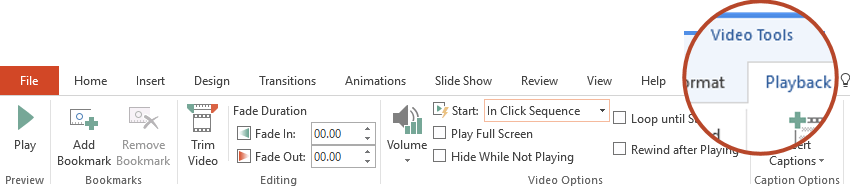
To control how your video plays, use options on the Playback tab. This tab appears on the ribbon when you click on a video in a slide.

Source: Set the ‘Play’ options for a video in your presentation

  • ← Hiding a Mic in Plain Sight
  • When You Should NOT Use 3-Point Lighting →

You May Also Like

Create a Shootout Scene in After Effects

Create a Shootout Scene in After Effects

ah-blogEditor-SC 0
Free Media for Creative Projects

Free Media for Creative Projects

ah-blogEditor-SC 0
PAX – Event Highlights

PAX – Event Highlights

ah-blogEditor-SC 0

Stay Updated

  • Register

My Workflow Light & Colour FX

https://vimeo.com/334141470?loop=0

Recent Posts

  • Creative Activities for Kids – Apple Education – 9to5Mac
  • Recording Voiceovers
  • Easy Stereo Recording
  • CSPA Basic Skills Indicator
  • PunchUp Boring Shots with Rotobrush

Tags

3D ACER Adobe Adobe After Effects Adobe Premiere Pro After Effects Animation Audio Camera Colour Colour Correction Colour Grading Compression DaVinci Resolve Design Editing Education FCPX Film Filmmaking Final Cut Pro X Free How to Interview Learning Lighting Motion Graphics Photography Photos Photoshop Planning Post- Production Premiere Pro Production SFX Social Media Sound Tips Tips & Tricks Tricks Tutorial VFX Video Video Production Workflow

Categories

Archives

Creating a Podcast Guide

Creating a Podcast Guide

Alex No Comments
  • Learn
  • Work
  • Blog
  • About
  • Contact
All rights reserved © 2026