Monday, December 29, 2025
Recent:
  • CSPA Basic Skills Indicator
  • Education & Development – Animated Overview
  • Principal for a Day – Leadership & Collaboration
  • Australian Child Well-Being Project
  • PAX – Event Highlights
  • Digital Storytelling – John & Phyllis Wood
  • Life at ACER
  • Creative Activities for Kids – Apple Education – 9to5Mac
  • Recording Voiceovers
  • Easy Stereo Recording
  • CSPA Basic Skills Indicator
  • PunchUp Boring Shots with Rotobrush
alexharkness.com

alexharkness.com

DESIGN : DELIVER : INSPIRE

Recent Posts

  • Creative Activities for Kids – Apple Education – 9to5Mac
  • Recording Voiceovers
  • Easy Stereo Recording
  • CSPA Basic Skills Indicator
  • PunchUp Boring Shots with Rotobrush

Archives

Categories

  • Blog
  • Learn
  • Random
  • Resources
  • Work

Tags

3D ACER Adobe Adobe After Effects Adobe Premiere Pro After Effects Animation Audio Camera Colour Colour Correction Colour Grading Compression DaVinci Resolve Design Editing Education FCPX Film Filmmaking Final Cut Pro X Free How to Interview Learning Lighting Motion Graphics Photography Photos Photoshop Planning Post- Production Premiere Pro Production SFX Social Media Sound Tips Tips & Tricks Tricks Tutorial VFX Video Video Production Workflow
alexharkness.com

  • Learn
  • Work
  • Blog
  • About
  • Contact
Motion Tracking in After Effects
Blog Learn 

Motion Tracking in After Effects
ah-blogEditor-SC 3423 Views After Effects, Motion Tracking, Point Tracker

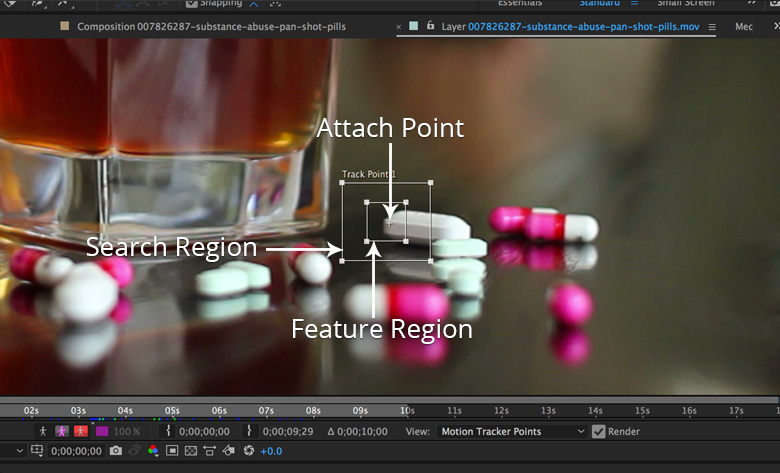
The Point Tracker is the most basic and the oldest tracker in After Effects, but it has some big advantages — one of which is allowing you to choose which features to track in a scene.

Source: Motion Tracking in After Effects: How to Use the Point Tracker | Pond5

  • ← GoPro Protune Importing and Color Correction (FCPX)
  • GoPro HERO5 Black – Full rundown →

You May Also Like

Photo Gallery in After Effects

Photo Gallery in After Effects

ah-blogEditor-SC 0
Professor John P Keeves – Video Interview

Professor John P Keeves – Video Interview

Alex 0
How to Export Icons in Illustrator for Premiere Pro and After Effects

How to Export Icons in Illustrator for Premiere Pro and After Effects

ah-blogEditor-SC 0

Stay Updated

  • Register

My Workflow Light & Colour FX

https://vimeo.com/334141470?loop=0

Recent Posts

  • Creative Activities for Kids – Apple Education – 9to5Mac
  • Recording Voiceovers
  • Easy Stereo Recording
  • CSPA Basic Skills Indicator
  • PunchUp Boring Shots with Rotobrush

Tags

3D ACER Adobe Adobe After Effects Adobe Premiere Pro After Effects Animation Audio Camera Colour Colour Correction Colour Grading Compression DaVinci Resolve Design Editing Education FCPX Film Filmmaking Final Cut Pro X Free How to Interview Learning Lighting Motion Graphics Photography Photos Photoshop Planning Post- Production Premiere Pro Production SFX Social Media Sound Tips Tips & Tricks Tricks Tutorial VFX Video Video Production Workflow

Categories

Archives

Collection 2013/14

Collection 2013/14

Alex No Comments
  • Learn
  • Work
  • Blog
  • About
  • Contact
All rights reserved © 2025